Lessons From Building Claude Code: How the Team Uses Skills
The lessons Anthropic shared from building Claude Code skills: 9 skill categories, gotchas, trigger-first descriptions, and how we use them ourselves.
The skill that writes this blog carries 2 numbers: 30 words per sentence, 70 words per paragraph. A linter sitting in the same folder enforces both, so a draft that drifts fails the run.
That is the line between a prompt and a skill. A prompt asks for something. A skill ships with its own test.
Anthropic runs hundreds of Claude Code skills in daily work, and the lessons are practical. A skill is a folder, not a markdown file. The description is a trigger, the gotchas section carries the value, and detail lives in files the agent opens on demand.
I run a 6-skill pipeline that drafts and ships this post. This page carries the file-level detail: the context bill, the gotchas from live bugs, and the checks I run before a skill goes live.
TL;DR
- A skill is a folder.
SKILL.mdis the map,references/holds the weight, andscripts/holds code the agent runs instead of writing. - The
descriptionfield decides whether a skill fires, because Claude Code builds a listing at session start and matches each request against it. - Anthropic’s internal set clusters into 9 categories, and the highest-value section in any of them is a gotchas list built from real failures.
- The 6 skills behind this blog total 1,080 lines and 12,892 words, and none of it loads until a stage matches.
What are the lessons from building Claude Code skills?
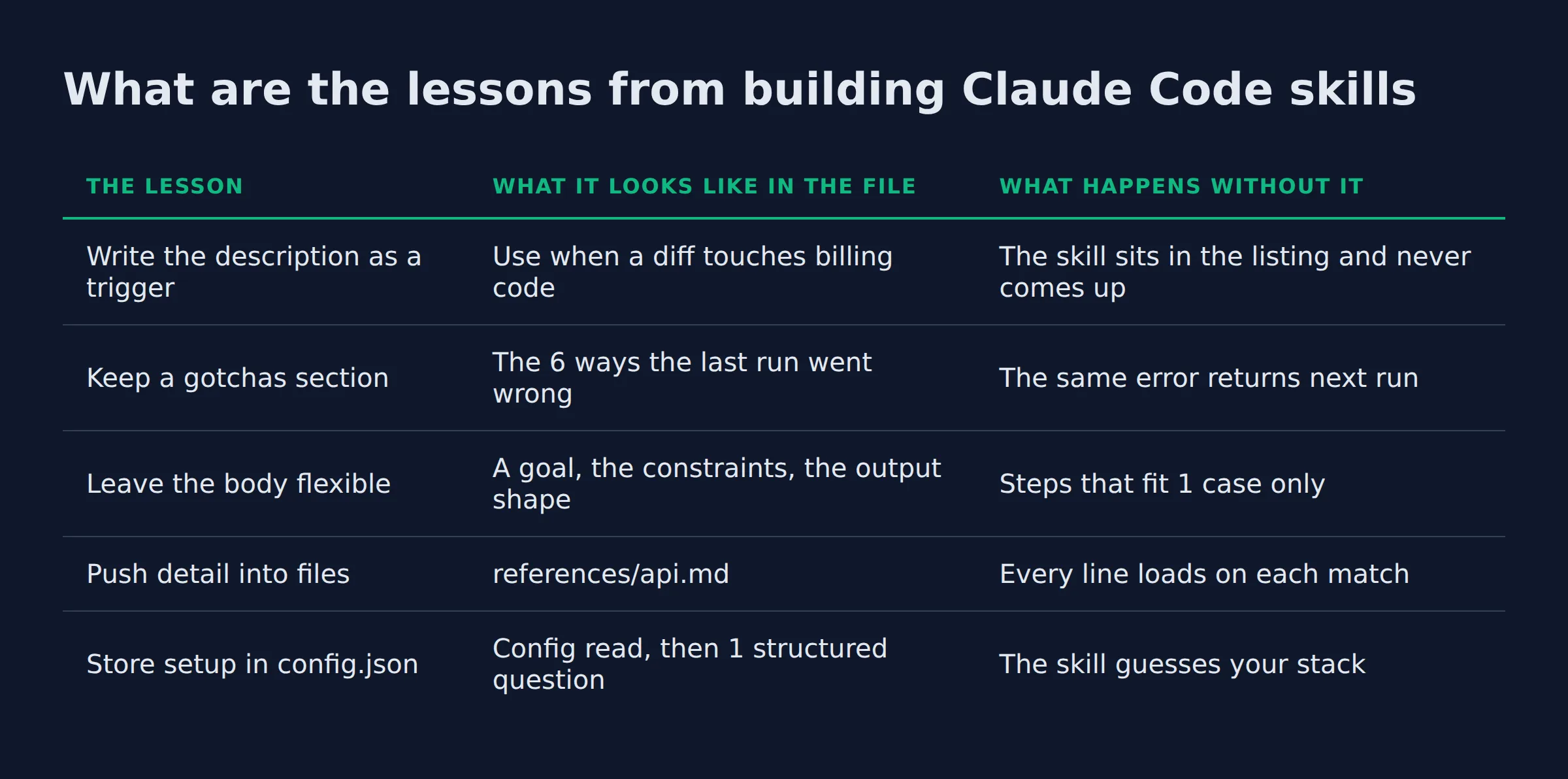
Anthropic’s lessons come down to 5 rules. Treat the skill as a folder. Write the description as a trigger, keep a gotchas section, and leave the body flexible. Detail belongs in reference files the agent opens on demand.
Those rules came out of a year of internal use. Skills shipped on October 16, 2025. On December 18, 2025 Anthropic added organization-wide management and a partner directory. That same update published Agent Skills as an open standard, so a skill now runs across tools.
Thariq Shihipar, who builds Claude Code, cataloged the internal set in March 2026 and published the lessons from hundreds of skills in active use. The table below is the short version, with the failure each rule prevents.
The same text also circulates as a mirrored transcript with links back to the March 17 thread. That copy is the one to read when LinkedIn throws a login wall at you.
| The lesson | What it looks like in the file | What happens without it |
|---|---|---|
| Write the description as a trigger | Use when a diff touches billing code |
The skill sits in the listing and never comes up |
| Keep a gotchas section | The 6 ways the last run went wrong | The same error returns next run |
| Leave the body flexible | A goal, the constraints, the output shape | Steps that fit 1 case only |
| Push detail into files | references/api.md |
Every line loads on each match |
Store setup in config.json |
Config read, then 1 structured question | The skill guesses your stack |
Row 1 is where my own first skills failed. I described the output, and the model needed the input.
A skill earns its place with the gotchas it collects, and the instructions are the part anyone could write.
What kinds of skills does Anthropic actually build?
Anthropic’s internal skills cluster into 9 categories, from library reference to infrastructure operations. The list covers verification, data fetching, business process automation, scaffolding, code review, CI/CD and runbooks. Most skills fit 1 category cleanly, and the messy ones straddle 2.
The categories came from cataloging their own set, and Shihipar calls the list a coverage check rather than a taxonomy. Used that way it is useful: walk your own folder and ask which category has nothing in it.
| Category | What it packages | Anthropic examples |
|---|---|---|
| Library and API reference | How to use a library, CLI or SDK, plus the traps | billing-lib, internal-platform-cli, frontend-design |
| Product verification | How to prove the product works, often with an outside tool | signup-flow-driver, checkout-verifier, tmux-cli-driver |
| Data fetching and analysis | Credentials, dashboard IDs and the query patterns | funnel-query, cohort-compare, grafana |
| Business process and team automation | A repeating workflow collapsed into 1 command | standup-post, weekly-recap |
| Code scaffolding and templates | Boilerplate for one kind of file, app or migration | new-migration, create-app |
| Code quality and review | Your rules plus deterministic checks on a diff | adversarial-review, code-style |
| CI/CD and deployment | Fetch, push and ship inside the repo | babysit-pr, cherry-pick-prod |
| Runbooks | A symptom walked into a structured report | oncall-runner, log-correlator |
| Infrastructure operations | Routine maintenance, with guardrails on the sharp edges | dependency-management, cost-investigation |
Verification skills are the category most small teams skip, and Shihipar’s post argues they are worth an engineer’s full week. They pair with a tool that can actually see the product: Playwright for a signup flow, tmux for a CLI. The skill holds the steps and the tool holds the evidence.
Data skills work the same way. They carry the credentials, the dashboard IDs, and the query a teammate would otherwise retype. The expensive version of that pattern is a skill that keeps its own state. The memory tip names a SQLite file as the heavy end of what a folder can hold.
Business process skills rarely stand alone. In Shihipar’s version they lean on another skill or on an MCP server that reaches the ticket system. That is where a 5-line skill turns into a dependency.
The frontend-design skill is the clearest example of what belongs in a knowledge skill. It exists to push Claude off its defaults, and those defaults had names. Inter as the safe font, purple gradients as the safe palette.
The category a team is missing usually tells you which job nobody has written down.
Why is the description the most important line in a skill?
The description is the part of a skill that decides matching, and it holds its place in the listing on every turn until that listing overflows. Claude Code lists names and descriptions at session start, then scans the list to match a request.
The frontmatter reference says the same thing in fewer words: Claude uses the description to decide when to apply the skill. That makes it a matching rule, not a summary.
The name field sets the command you type. The description carries every bit of the matching, so a better name buys you nothing at trigger time.
Three format traps sit around that line, and all 3 fail quietly.
- An unknown field is dropped. A misspelled key like
allowed_toolsis ignored with no warning, so the setting never applies. - Line 1 has to be the opening
---. Put a comment or a blank line above the frontmatter and the whole file is parsed as body. - Bad YAML still loads. The skill runs when you type its name, and the description is empty, so it never fires on its own.
The docs list that last case under troubleshooting, and --debug prints the parse error. For a whole folder at once, claude plugin validate .claude/skills reports every SKILL.md whose frontmatter does not parse, which caught 2 broken files in my own set.
A description written like a summary is a description that never matches.
The rewrite: from summary to trigger, on one line
The same skill can be described in 2 ways, and only 1 matches the request. A summary states what the file produces. A trigger states the moment to reach for it.
Here is the summary shape:
description: Produces a blog post in content-capsule format.
Here is the trigger shape, from my own copywriter skill:
description: Use when the SEO orchestrator dispatches the draft stage, or the goal is to write the post from this brief.
The orchestrator hands off a job called the draft stage. A line that describes a finished artifact gives it nothing to match. The second line names the event and the words I use when I ask for the work.
4 things belong in that line, in this order:
- The event. What is happening when the skill should fire.
- The words. The phrasing a real user types, not your internal name for the job.
- The surface. The files or systems the skill touches, like a migration or a dashboard.
- The limit. What the skill does not cover, so a near miss stays out.
The same problem runs in reverse when 2 skills claim the same ground. Claude picks 1, the loser goes quiet, and its description is the first thing dropped when the listing overflows. Keep 1 owner per job.
Write the description for the request that arrives, because that request is all the model sees.
What is a gotchas section and why does it do the heavy lifting?
A gotchas section is a list of the ways this skill has failed before, kept in the body and extended after each miss. It beats the instructions on signal, because Claude already knows the general method and does not know your traps.
Shihipar calls it the highest-signal content in any skill, built from common failure points and updated over time. My own version is closer to a scar list, and 3 of the entries came from live bugs.
- Bare angle brackets get deleted. A published post of mine shipped a skills path with an empty folder segment, because the
<skill-name>part was parsed as HTML and dropped. The docs describe the same loss on their troubleshooting page, where angle brackets show as<. My reviewer now rejects any draft with an unbackticked placeholder. - A
faqblock written as prose. The reviewer rejects the draft before publish, which is cheaper than shipping a page whose questions never render. - A draft truncated to 0 bytes. A pass that dies mid-write leaves an empty file, so the copywriter skill recovers the text from the session database before it rewrites a word.
The growth rule is simple. After any run where the output was wrong, add 1 bullet with the failure and the fix next to it. A skill with 10 gotchas has been tested 10 times.
Without that section, the skill repeats its last mistake with confidence. The docs make the same point from the other side. Once a skill loads, its body stays in context across turns. A vague rule then costs tokens on every turn after it.
A gotchas list is the part of a skill that gets better every time it goes wrong.
How should a skill use its folder?
SKILL.md is the map and stays short. The weight sits in sibling files: references/ for detail, scripts/ for code the agent runs, and assets for templates. The body names each file and the moment to open it.
The Claude Code skills documentation gives the pattern and the ceiling. Point at each supporting file from the body so Claude knows what it holds, and keep SKILL.md under 500 lines.
Anthropic’s platform overview calls the arrangement progressive disclosure. Detail loads in stages, and until a skill triggers only its name and description sit in context.
- Reference files load when the body sends the agent there. Signatures and examples live in
references/api.mdinstead of the main file. - Scripts are executed, not read. A helper in
scripts/costs nothing in context beyond the 1 line that calls it. - Setup answers live in
config.json. If the file is empty, the skill asks once withAskUserQuestionand writes the answer down. - Data the skill keeps goes outside the folder.
${CLAUDE_PLUGIN_DATA}is the stable per-plugin location, because a skill directory can be wiped on upgrade.
2 more fields sit on the skill itself. The allowed-tools field pre-approves the tools it names for the turn that invokes the skill. So allowed-tools: Read Grep means no approval prompt for those 2, and every other tool stays callable. To take a tool away, disallowed-tools drops it from the pool while the skill is active.
The /careful hook registers a PreToolUse matcher on Bash for the session. While the skill runs, it blocks rm -rf or force-push. /freeze guards writes outside 1 directory the same way. Both arrive with the skill and leave with the session.
| Content | Lives in | Loads |
|---|---|---|
| The procedure and the rules | SKILL.md body |
On a match |
| Long reference and API detail | references/*.md |
When the body points there |
| Code the agent should run | scripts/ |
Executed, not read |
| Setup answers and IDs | config.json |
On the first run |
| State the skill keeps | ${CLAUDE_PLUGIN_DATA} |
On use, and it survives upgrades |
Put the procedure in the body and everything else in a file the body points at.
What I moved out of CLAUDE.md, measured
Six skills run this blog, and their SKILL.md files total 1,080 lines and 12,892 words. None of it loads until a stage matches.
I measured that with wc on the folder, because the number is the argument. The CLAUDE.md in the site repo is 22 lines and 79 words, and every line is a fact about the framework.
Sitting in CLAUDE.md, the same text would load on every turn of every session, including the turns spent on something else. The loading rules put the trade plainly: a skill’s body loads only when it is used, so long reference material costs almost nothing until you need it.
The split I follow is boring and it works.
CLAUDE.mdholds facts. We build with npm. The dev server starts asastro dev --background, andastro dev logsreads its output.- A skill holds a procedure. Steps, thresholds, refusals and the file it hands off.
If you want the mechanics of adding the first one, how to add a skill to Claude Code walks the folder and the frontmatter.
The move that freed the most context was a procedure leaving CLAUDE.md for a folder.
How do you ship skills to a team without bloating context?
Commit skills to .claude/skills while the team and the repo count are small. Past that, a plugin marketplace lets each person install what they need, so nobody pays context for a skill they never use.
Those are the 2 routes Shihipar names, plus the personal folder you already have. Scale decides between them. Every skill checked into a repo adds a little to the model’s context for everyone who opens that repo.
- Checked into the repo. Best for a small team working across a few repos. One commit and everyone has it, with no install step.
- A plugin marketplace. Best once the skill count passes what 1 team can agree on. Install becomes a choice per person, and the marketplace stays small and reviewed.
- Personal, in
~/.claude/skills. Best for a habit you have not shared yet, since it follows you across every project on that machine.
The docs list where skills load across 6 locations, from enterprise to plugin. Each row answers a different question about who gets the skill and when.
Curation is the part people skip. There is no central team deciding what enters an internal marketplace. A skill goes into a sandbox folder first, gets pointed at in chat, and earns a PR into the marketplace once it has traction. Skipping that step is how a marketplace fills with 4 skills that do the same job.
Composition happens by name. A skill can tell Claude to use another skill, and the model invokes it when that skill is installed. That is the whole dependency system, so name the skill you depend on and keep the fallback in the gotchas.
Distribution decides who pays the context, so the repo route stops scaling before the skills do.
How do you know a skill is actually firing?
Firing and working are 2 different measurements. Check whether Claude invoked the skill on the prompts it should have, then check separately whether the output matched what you wanted. A usage log answers the first question and nothing else.
Claude Code has a report for the firing half. Run /skill-doctor to see the context cost of each skill in the session, plus the ones that have never been invoked. Run /doctor for an estimate of the listing’s total cost before you add another skill.
When a skill never fires at all, the troubleshooting section lists the causes in a short order.
- The description does not contain the words the request used.
- The skill is not in the listing at all, so the file failed to parse.
- The files the skill reads sit outside the working directory, and
pathscannot reach them. - The YAML is malformed, so the body runs from
/skill-nameand the description is blank.
The steady-state version is a PreToolUse hook that logs every skill call, which is how Anthropic spots the popular skills and the ones under-triggering against expectations. A log line per call is enough to see a skill go quiet.
For a real answer instead of a hunch, the skill-creator plugin runs apples-to-apples tests. Install it from claude-plugins-official. It stores prompts and expected behavior in evals/evals.json, spawns a subagent per case, and shows you both runs side by side. A tool_used: Skill grader answers the firing question, and claude plugin eval runs the set after each description change.
Track firing and quality apart, because 1 number hides the other.
How do we use these lessons in our own agents?
The pipeline behind this post is 6 skills in 1 folder. Each has a narrow job, a numeric threshold and a handoff file, and the runner reads 1 output: the reviewer’s verdict.
Narrow is the part that matters. The keyword researcher returns a topic and a cluster slot. The planner returns a brief with the competitor gap. The copywriter returns a draft and its FAQ. The reviewer returns APPROVE or REJECT plus a fix list, and the publisher writes the post.
Two of those skills failed, and neither fix was a rewrite.
The reviewer first returned a rubric, a list of things to consider. run.sh could not branch on prose, so the run continued on a draft full of notes. The fix was 1 constraint: a verdict token plus a fix list, which the runner now reads.
The second failure came from a gate that passed a fix and broke an earlier one. That gate now re-reads every prior fix list before it approves, so a regression is caught on the same run that causes it. That is the gotcha rule applied to a whole pipeline instead of 1 file.
The rules that keep the output stable are the same ones I ship as a skills bundle, all of it for $99. If you would rather start from a set than a blank folder, the best Claude Code skills to install covers the ones worth the context they cost.
 AutomateReal skills
A pipeline of narrow skills beats 1 large skill, because every handoff has a check.
The 10-minute audit I run before trusting a skill
I run 8 checks on a new skill before it enters a run. The list takes about 10 minutes and it catches the failures that throw no error, which are the only ones that cost me a day.
- Read the description cold. If you cannot tell which request it answers, it will not match one.
- Invoke it by name once. A parse failure shows up here and nowhere else.
- Send a request in a user’s words and watch whether Claude picks it without being told.
- Check line 1. The opening
---has to sit on the first line of the file. - Count the body lines. Past 500, move the detail into
references/. - Add 1 gotcha from the last run that went wrong, with the fix beside it.
- Set the number that decides. A threshold, a cap, or a refusal with a plain reason.
- Run
/skill-doctorand note the context cost before you add the next one.
Then leave it alone for a week. A skill that has not been invoked in 7 days is either badly described or not needed, and both answers are useful.
A skill you have never invoked is a document waiting for a reader.
 AutomateReal services
FAQ
Are Claude Code skills free to use?
Writing a skill costs nothing, and a skill is a folder you commit like any other file. Anthropic published the format as an open standard on December 18, 2025, so the same skill runs across tools. Running one still needs Claude Code, which is a paid product.
Do these lessons hold for one person instead of a team of hundreds?
Yes, and most of them matter more at that size. A solo operator has no reviewer to catch a vague description, so the gotchas list is the only memory the system keeps. Start with 1 skill for the job you repeat weekly.
How many skills should I keep installed at once?
There is no fixed count. The listing budget scales at 1% of the model’s context window. When it overflows, Claude Code drops descriptions starting with the least-used skills. That quietly removes the keywords matching depends on.
What is the difference between a skill, a subagent, and a slash command?
A slash command is now a skill. A file at .claude/commands/deploy.md and a folder at .claude/skills/deploy/SKILL.md both create /deploy. The folder adds supporting files and frontmatter control. A subagent is a separate context window with its own tools, and a skill can run inside one.
Can I share a skill with my team without running a marketplace?
Commit the folder to the repo under .claude/skills. Everyone who opens the repo loads it, and the cost is that everyone pays its listing entry whether they use it or not. Move to a marketplace when that trade stops paying.
If you have a procedure you repeat every week and no folder for it yet, a discovery call takes about 30 minutes and we map the first one.